- Who files
- Each terminal operator, per approved terminal
- Due
- Last day of the following month
- Filed with
- ExSTARS (25+ transactions) or IRS Cincinnati
- Form revision
- Rev. September 2010
- Pages
- 3
At a glance
Form 720-TO is the terminal operator's monthly information return. “Use Form 720-TO if you're a terminal operator to report monthly receipts and disbursements of all liquid products to and from all approved terminals.” It reports gallons, not tax: the IRS matches it against the position holders' Form 720 and the carriers' Form 720-CS. The tax itself is explained on the federal fuel excise tax page (the rack, the position holder and two-party exchanges).
- Who files. “Each terminal operator is required to file a separate Form 720-TO for each approved terminal.” “Reporting is required for inactive terminals.” The IRS's manual adds: “Currently, a terminal with a TCN is the only FCN required to file ExSTARS Form 720-TO reports.”
- When. Monthly: “The report is due the last day of the month following the month in which the transaction occurs.” The regulation says the same (26 CFR 48.4101-2)26 CFR 48.4101-2Code of Federal Regulations, eCFR. A weekend or legal holiday due date moves to the next business day.
- How. Electronically through ExSTARS, or on paper to “Internal Revenue Service Attn: Excise Unit Stop 5701G Cincinnati, OH 45999” if you have fewer than 25 transactions a month.
- Form revision. Form 720-TO (Rev. September 2010), with the Instructions for Form 720-TO (Rev. July 2017): page 1 (Parts I to III), Schedule A (receipts) and Schedule B (disbursements). Both still current as of November 2026.
- Records. “Keep copies of information returns you've filed with the IRS or the data to reconstruct them for at least 3 years from the date of the return.”
ExSTARS: electronic or paper
The Excise Summary Terminal Activity Reporting System (ExSTARS) is the IRS's electronic channel for Forms 720-TO and 720-CS. The statute makes it mandatory at a volume threshold: “Any person who is required to report under this subsection and who has 25 or more reportable transactions in a month shall file such report in electronic format.” (IRC 4101(d)). The instructions repeat it: “Electronic filing is required for each return reporting 25 or more transactions a month.” The file formats and testing are in Pub. 3536, Motor Fuel Excise Tax EDI Guide. The paper form on this page is for small filers and for reading what the electronic record must hold, line for line.
Instructions for Form 720-TO (Rev. July 2017); IRC 4101(d)IRC 4101Internal Revenue Code, Cornell LII; 26 CFR 48.4101-226 CFR 48.4101-2Code of Federal Regulations, eCFR.
Tap a box once for its note, again to jump to the line. Zoom in to read the small print.
Header, Part I and Part II
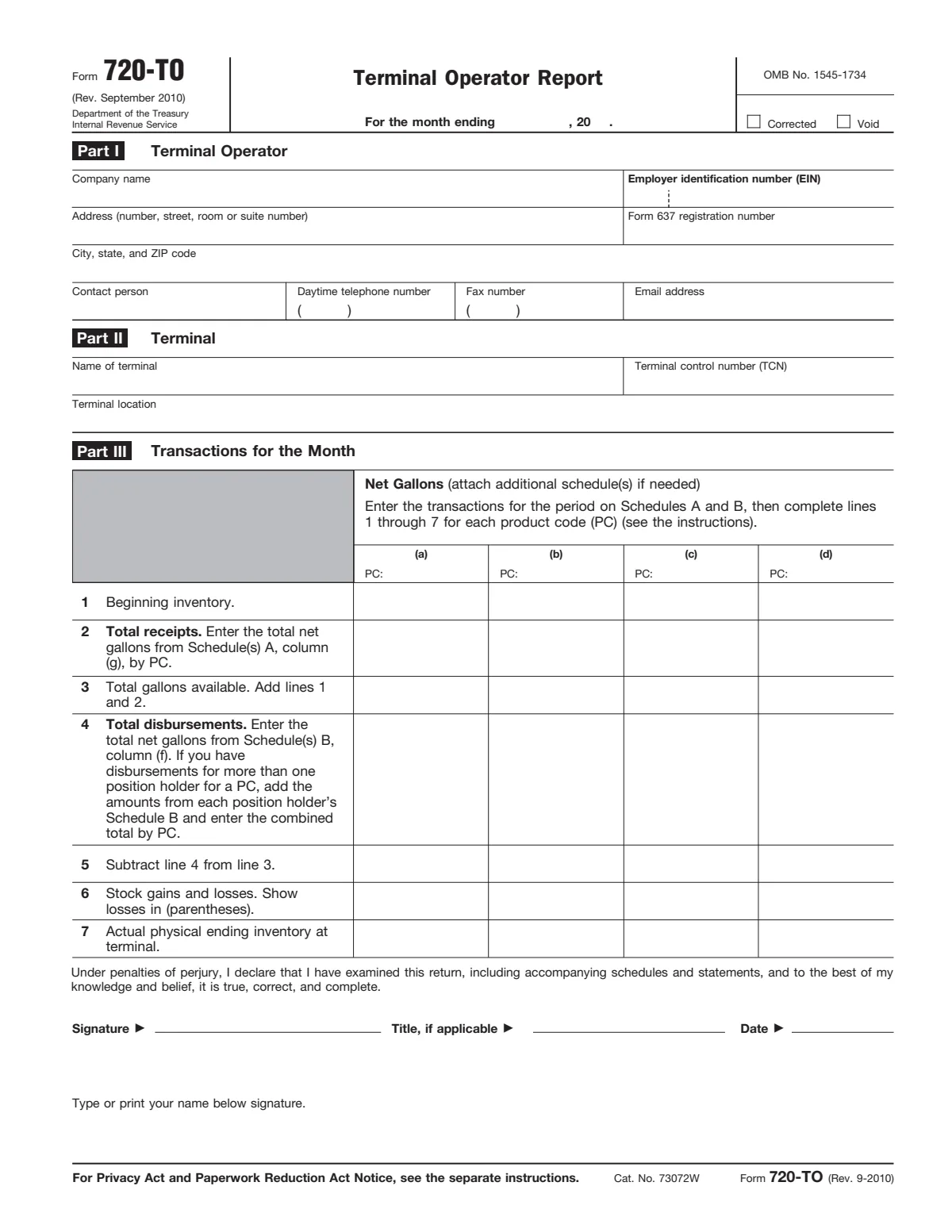
Part I identifies the terminal operator and Part II the terminal. The registration number and the terminal control number (TCN) are what tie the report to the IRS's registration and terminal records, so use them exactly as issued.
| Line | Label | What goes there |
|---|---|---|
| Month | For the month ending | The last day of the reporting month. “The report is due the last day of the month following the month in which the transaction occurs.” |
| Corrected | Corrected | To fix a paper report, send the first page and the wrong schedule with Void checked, marking the transaction, and then “Then, complete another first page of Form 720-TO along with the corrected schedule(s) with the ‘Corrected’ box checked.” Electronic filers correct under Pub. 3536. |
| Company | Company name | The terminal operator: the registrant that operates this approved terminal, not the position holders that store product in it. |
| EIN | Employer identification number (EIN) | Enter your EIN; if one was applied for but not received, write "Applied for". The penalty for an incorrect return also applies to an incorrect or missing EIN. |
| Address | Address (number, street, room or suite number) | Include the suite or room after the street address. |
| Reg637 | Form 637 registration number | “Enter the assigned IRS registration number.” Terminal operators must be registered under section 4101 (26 CFR 48.4101-1(c)(1))26 CFR 48.4101-1Code of Federal Regulations, eCFR; without a number, apply on Form 637. |
| City | City, state, and ZIP code | A foreign address goes city, province or state, country, without abbreviating the country. |
| Contact | Contact person | “Enter the name, daytime telephone number, fax number, and email address for the person who should be contacted to discuss this information return.” |
| Phone | Daytime telephone number | The contact person's daytime number. |
| Fax | Fax number | The contact person's fax number, if any. |
| Email address | The contact person's email address. | |
| Terminal | Name of terminal | “Enter the name and location of the terminal as published on the IRS website.” |
| TCN | Terminal control number (TCN) | “Enter the TCN assigned to the terminal's physical location by the IRS.” One Form 720-TO per TCN. |
| Location | Terminal location | The terminal's physical location as shown in the IRS terminal list. |
Part III: transactions for the month
Part III is a monthly inventory reconciliation for each product code: what was on hand, what came in (Schedule A), what went out (Schedule B), and the measured ending inventory. Gallons are net gallons, “Liquid product measured in U.S. gallons corrected to a temperature of 60° Fahrenheit or 15° Celsius and to a pressure of 14.7 pounds per square inch (psi).”
| Line | Label | What goes there |
|---|---|---|
| PC | PC: | Enter a product code from Table 2 of the instructions at the head of each column, then lines 1 to 7 for that product. For more than four products, attach additional schedules. “Enter the transactions for the period on Schedules A and B, then complete lines” 1 through 7. |
| 1 | 1 Beginning inventory. | “Enter the physical inventory of net gallons by product code at the beginning of the reporting period.” “This should be the same number as reported for actual ending inventory the previous month.” |
| 2 | 2 Total receipts. Enter the total net | The net gallons received during the month from Schedule(s) A, column (g). With several Schedules A for one product, combine their column (g) totals here. |
| 3 | 3 Total gallons available. Add lines 1 | Beginning inventory plus receipts. |
| 4 | 4 Total disbursements. Enter the | Net gallons disbursed, from Schedule(s) B, column (f). Disbursements for more than one position holder in a product are added together here. |
| 5 | 5 Subtract line 4 from line 3. | What the terminal should hold if every receipt and disbursement was counted. |
| 6 | 6 Stock gains and losses. Show | “Enter all gains and losses by product code.” “Book adjustments or other known transactions are not considered gains or losses.” |
| 7 | 7 Actual physical ending inventory at | “Enter the actual physical ending inventory at the terminal.” |
| Sign | Type or print your name below signature. | “Form 720-TO must be signed by a person who has authority to sign.” Type or print the name below the signature. |
Schedule A: receipts
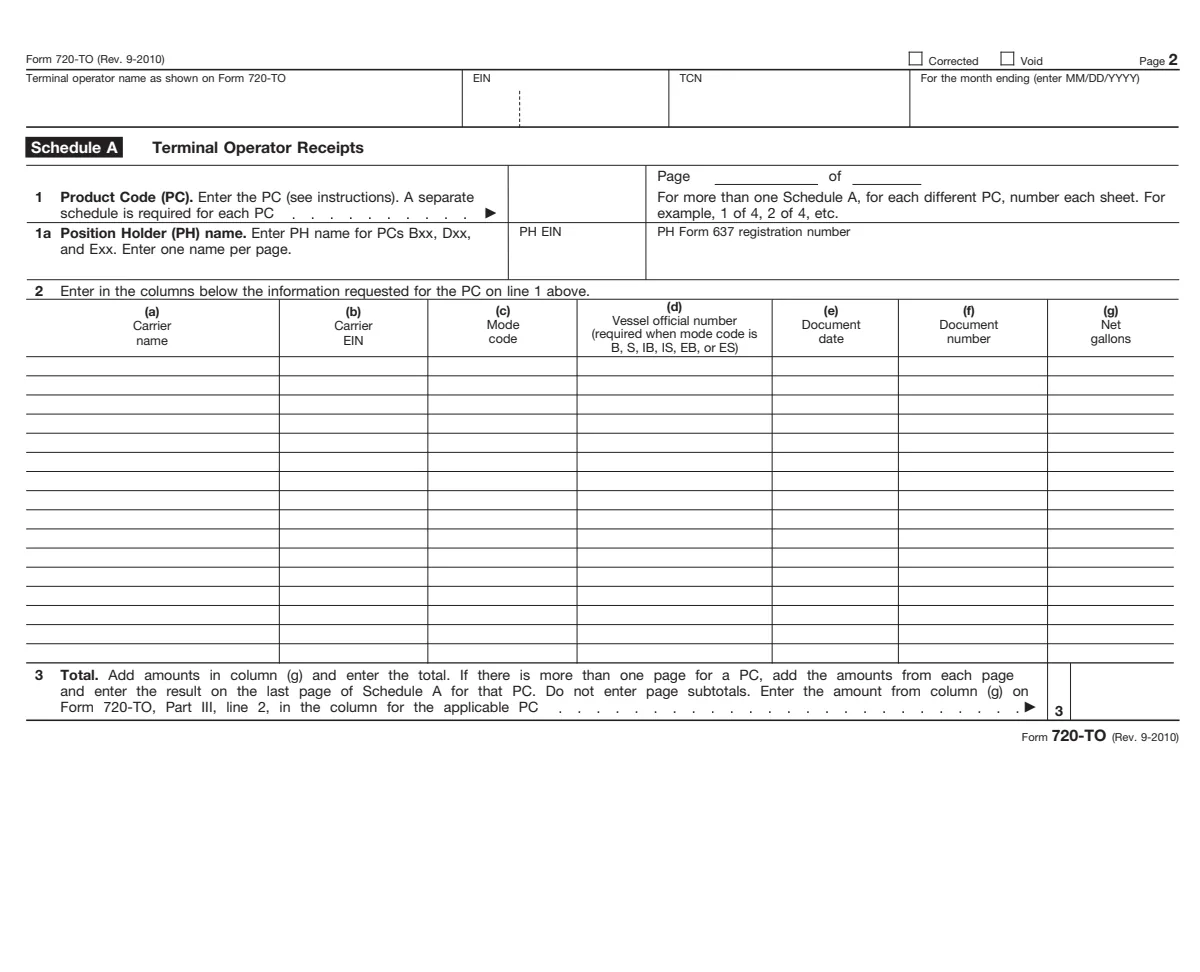
Schedule A lists each receipt of product into the terminal, bulk and non-bulk, on a separate schedule for each product code. Non-bulk receipts of product codes 001, 049, 092, 122, 188 and 960 may be summarized by month under the optional summary rules (carrier "Various", your EIN, mode CE). “Zero gallon transactions are not allowed on Schedule A or Schedule B.”
| Box | Label | What goes there |
|---|---|---|
| A-top | Terminal operator name as shown on Form 720-TO | The operator name as on page 1, the EIN, the TCN and the month ending (MM/DD/YYYY). |
| A-page | For more than one Schedule A, for each different PC, number each sheet. For | Number the sheets for each product code. |
| A-1 | 1 Product Code (PC). Enter the PC (see instructions). A separate | A product code from Table 2. Blending components not listed are product code 122. A separate Schedule A is required for each product code. |
| A-1a | 1a Position Holder (PH) name. Enter PH name for PCs Bxx, Dxx, | “For products codes Exx, Bxx, and Dxx received at a TCN, enter the name of the PH inside the TCN.” Also its EIN and registration number; one position holder per page. |
| A-a | Carrier | “Enter the name of the carrier that transports the product into the terminal.” |
| A-b | EIN | “Enter the carrier's EIN.” For a foreign flag vessel, the EIN of the importer of record. Ask carriers for their EIN on Form W-9. |
| A-c | Mode | “Enter the mode code. See Table 1.” Imports use IB, IS or IP; product reclassifications use BA. |
| A-d | Vessel official number | “If the mode code in column (c) is either a barge (B, IB, or EB) or a ship (S, IS, or ES), enter the vessel official number.” |
| A-e | Document | “Enter the date the product was received into the terminal (mmddyyyy).” |
| A-f | number | “Enter the identifying number from the document provided by the carrier that reflects the details of the transaction.” “Both the carrier and terminal operator must report the same document number.” |
| A-g | gallons | “Enter the actual net gallons received into the terminal.” For non-bulk deliveries where net gallons are not measured, enter gross gallons. |
| A-3 | 3 Total. Add amounts in column (g) and enter the total. If there is more than one page for a PC, add the amounts from each page | Total net gallons for the product on the last Schedule A page for it, with no page subtotals, and carry it to Part III, line 2, in that product's column. |
Schedule B: disbursements by position holder
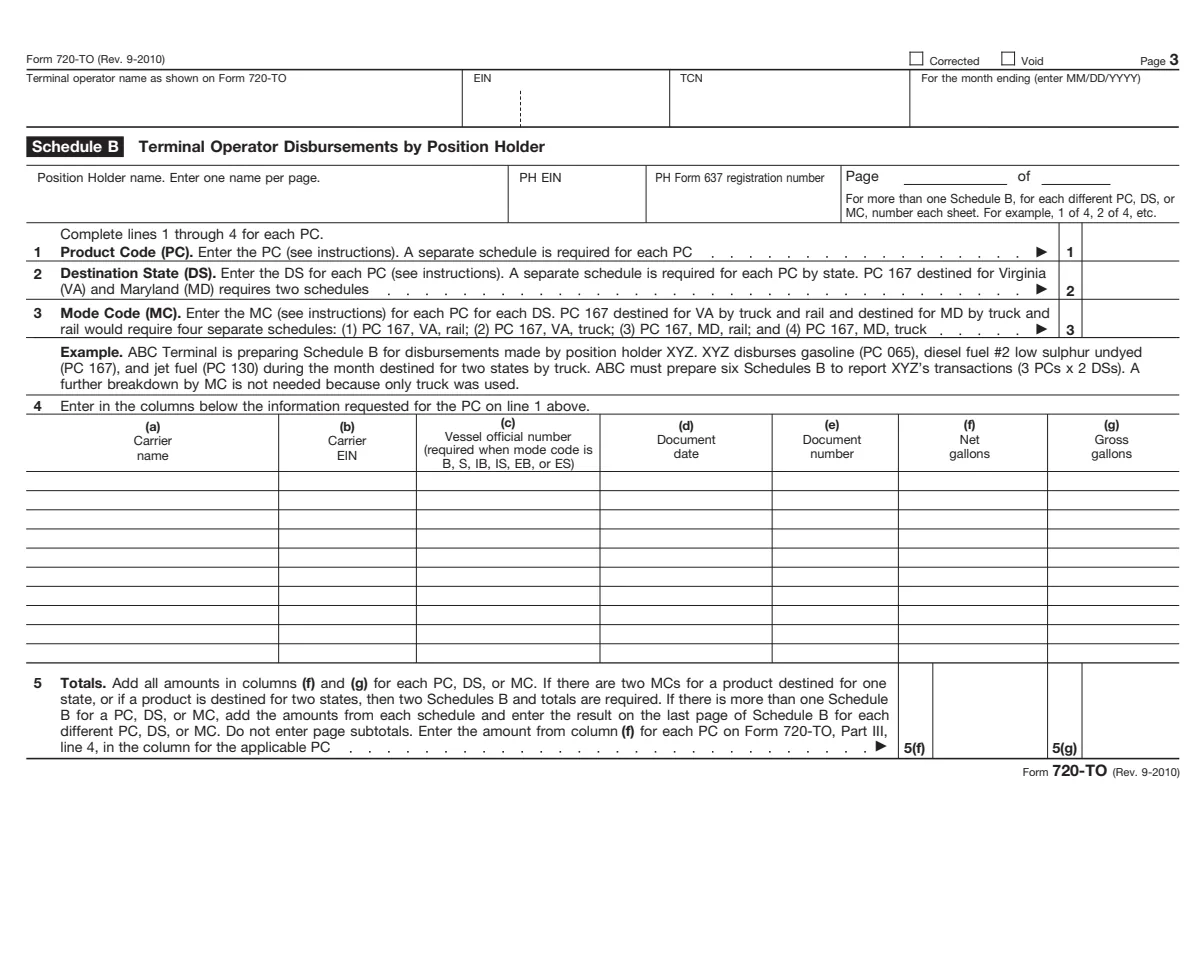
Schedule B lists each disbursement by position holder. A position holder, for this report, is the person that holds the inventory position in the product on the operator's records; the term “also includes a terminal operator that owns a liquid product in its terminal.” A separate Schedule B is needed for each position holder, product code, destination state and mode of transport.
| Box | Label | What goes there |
|---|---|---|
| B-top | Schedule B Terminal Operator Disbursements by Position Holder | The operator name, EIN, TCN and month ending, as on Schedule A. |
| B-PH | Position Holder name. Enter one name per page. | “Enter the name of the entity holding the inventory position in the terminal.” The position holder is the one with the inventory position on the operator's records, usually the person liable for the tax at the rack. |
| B-page | For more than one Schedule B, for each different PC, DS, or | Number each Schedule B sheet within a product code, destination state and mode code. |
| B-1 | 1 Product Code (PC). Enter the PC (see instructions). A separate schedule is required for each PC | The product code from Table 2. |
| B-2 | 2 Destination State (DS). Enter the DS for each PC (see instructions). A separate schedule is required for each PC by state. PC 167 destined for Virginia | “The destination state code is required for non-bulk (truck or rail car) disbursements only.” Each bill of lading for a different state is a separate transaction. |
| B-3 | 3 Mode Code (MC). Enter the MC (see instructions) for each PC for each DS. PC 167 destined for VA by truck and rail and destined for MD by truck and | The mode code from Table 1. The form's example: one position holder, three products and two destination states by truck needs six Schedules B. |
| B-a | Carrier | The carrier that transports the product out of the terminal. For end use under mode RS or RF, the operator or position holder reports its own EIN as carrier. |
| B-b | EIN | “Enter the carrier's EIN.” For an export on a foreign vessel without an EIN, use your own; for a military vehicle, the Department of Defense EIN. |
| B-c | Vessel official number | If the carrier is a barge (B, IB or EB) or a ship (S, IS or ES), the vessel official number. |
| B-d | date | “Enter the date the product was removed from the terminal (mmddyyyy).” |
| B-e | number | The number on the document the operator gave the carrier (bill of lading, manifest or other shipping document). The carrier reports the same number. |
| B-f | Net | “Enter the actual net gallons disbursed from the terminal.” |
| B-g | Gross | “Enter the gross gallons disbursed from the terminal as shown on the document listed in column (d).” No entry for product codes 001, 049, 092, 122, 188 and 960. |
| B-5 | 5 Totals. Add all amounts in columns (f) and (g) for each PC, DS, or MC. | Totals for each product, destination state and mode on its last Schedule B page, with no page subtotals. The column (f) total for each product goes to Part III, line 4. |
Mode codes and definitions
Table 1 of the instructions lists the mode codes used on both schedules. Imports and exports are reported only with the listed import and export codes; reporting the country of origin or destination is optional.
| Mode | Meaning | Import | Export |
|---|---|---|---|
| J | truck | IJ (import by truck) | EJ (export by truck) |
| R | rail | IR (import by rail) | ER (export by rail) |
| B | barge | IB (import by barge) | EB (export by barge) |
| PL | pipeline | IP (import by pipeline) | EP (export by pipeline) |
| S | ship (Great Lake or ocean) | IS (import by ship) | ES (export by ship) |
| RS | products dispensed at a terminal for end-use or consumption | ||
| RF | removal from a terminal into refueling vessels | ||
| BA | product reclassifications | ||
| CE | summary |
Gross gallons are “The total product measured in U.S. gallons without temperature or barometric adjustments.” Product codes (Table 2 of the instructions) include 065 gasoline, 167 diesel fuel #2 low sulfur undyed and 130 jet fuel, the three in the form's own Schedule B example. A two-party exchange inside the terminal also appears on the receiving position holder's Form 720 Schedule T, which the IRS matches to this report.
Deadlines, extensions and the penalty
- Extensions. “A first time request for a 30-day extension will be granted, if received in writing on or before the due date of the report.” The IRS's ExSTARS manual says filers “must file Form 8809-EX, Request for Extension of Time to File an ExSTARS Information Return, to request an extension of time to file.”
- The penalty. A late report, or one missing required information or carrying wrong information, costs a flat amount per failure: “such person shall pay a penalty of $10,000 in addition to the tax (if any).” (IRC 6725), unless the failure is due to reasonable cause. The instructions add that it “also applies if you report an incorrect employer identification number (EIN) or fail to report an EIN where required.”
- Matching documents. Carriers report the same document numbers on Form 720-CS. A mismatch is one of the accuracy issues the IRS's ExSTARS examiners look for.
- Zero entries. On paper, leave boxes blank when no entry is required rather than writing 0 or None.
How it connects
- The tax behind the gallons: the federal fuel excise tax hub, the Form 637 registration guide (terminal operators are registrants) and the Form 637 form page.
- The return the position holders file: Form 720 line by line, including Schedule T for two-party exchanges.
- Dyed fuel at the rack: dyed fuel rules; terminal operators must give the dyed fuel notice on shipping papers (26 CFR 48.4101-1)26 CFR 48.4101-1Code of Federal Regulations, eCFR.
- Examinations: excise tax audits.
Questions filers ask
Who files Form 720-TO?
Every terminal operator, for each approved terminal it operates, every month, including months when the terminal was inactive. Carriers file Form 720-CS instead.
When is Form 720-TO due?
By the last day of the month after the month the transactions occurred, for example June 30 for May. A first 30-day extension is granted if requested in writing by the due date.
Do I have to file Form 720-TO electronically?
Yes, if you have 25 or more reportable transactions in a month (IRC 4101(d))IRC 4101Internal Revenue Code, Cornell LII. Electronic reports go through ExSTARS under Pub. 3536. Smaller filers may use the paper form.
What is the penalty for a late or wrong Form 720-TO?
$10,000 for each failure under IRC 6725IRC 6725Internal Revenue Code, Cornell LII, for filing late, leaving out required information or including incorrect information, unless the failure is due to reasonable cause.
Why does a position holder need its own Schedule B?
The IRS uses the position holder's disbursements to check the tax it reports on Form 720. Each position holder, product code, destination state and mode of transport gets its own Schedule B.
Are gallons reported net or gross?
Net (temperature corrected) gallons on both schedules, with gross gallons added in Schedule B, column (g). Non-bulk receipts not measured net may be reported gross on Schedule A.
Sources
- Form 720-TO, Terminal Operator Report (Rev. September 2010), PDF
- Instructions for Form 720-TO (Rev. July 2017)
- About Form 720-TO
- Publication 3536, Motor Fuel Excise Tax EDI Guide
- 26 U.S.C. 4101, registration and information reporting
- 26 U.S.C. 6725, failure to report information under section 4101
- 26 CFR 48.4101-2, information reporting
- IRM 4.24.26, ExSTARS